Key takeaways
- The 5 best PC cases with a tempered glass front for November 2026, chosen from Amazon listings for airflow, GPU clearance, and build quality.
A tempered glass front changes the whole decision around a PC case. With a mesh front, you buy airflow first and looks second. With glass across the front, you buy the view first, and then you have to make sure the case still moves enough air, still fits your graphics card, and still gives you room to build. That trade-off matters more than the brand on the box, because a beautiful case that cooks your components is a bad purchase no matter how good it looks on a desk.
This guide is for builders who want their hardware visible from the front of the desk, first-time builders who want a case that forgives messy cable work, and upgraders moving a long graphics card or a large liquid cooler into a showcase chassis. Every case below was picked from its name and specifications on its Amazon product page, with the front glass panel confirmed in the listing, so you can check each pick against the same source before you buy.
Quick Picks
As an Amazon Associate we earn from qualifying purchases.
| Product | Best for | Key spec from title |
|---|---|---|
| Antec C5 ARGB | A showcase build with fans already installed | 7x120mm ARGB PWM fans included, seamless tempered glass front and side panels |
| Lian Li O11 Vision Compact White | A compact premium build with a back-connect motherboard | Three-panel tempered glass, back-connect support |
| Thermaltake View 270 Plus TG ARGB Snow | A bright white build with front and side glass | 3x120mm ARGB fans included, front and side dual tempered glass panel |
| MUSETEX K2 Black | A full-view build with seven fans out of the box | 7 PWM ARGB fans pre-installed, full-view dual tempered glass |
| CORSAIR 3500X ARGB White | A clean panoramic build with reverse-connection board support | Panoramic tempered glass, 3x CORSAIR RS120 ARGB fans included |
How to Choose
Front glass versus airflow
A solid tempered glass front looks striking, but it blocks the straightest path for intake air, so the case has to pull air from somewhere else. Check whether the listing shows side, bottom, or top intake fans, because those become the real cooling path once the front is sealed behind glass. The Antec C5 ARGB and the MUSETEX K2 both lean on this idea, mounting fans along the side and bottom so air still reaches the graphics card. If a case has glass on the front and only one rear exhaust fan, expect higher temperatures under load, and plan on adding fans or choosing a cooler-running set of components.
Measure your graphics card and cooler first
Glass-front cases are often wider than they look, yet the glass panels and the second chamber can eat into the space a long graphics card needs. Before ordering, write down your graphics card length, your CPU cooler height, and your radiator size, then compare each number with the case dimensions and clearance figures on the Amazon listing. The Thermaltake View 270 Plus TG ARGB lists support for a radiator up to 360mm, which is a useful anchor, but radiator support does not guarantee that a thick radiator plus its fans will clear tall memory sticks. Measure twice, because returning a heavy glass case is far more trouble than checking a number.
Count the fans that are actually included
A case that ships with no fans can look like a bargain until you add three or four fans to the order, while a case with six or seven fans included is often the cheaper finished build. The Antec C5 ARGB includes seven ARGB PWM fans, the MUSETEX K2 includes seven PWM ARGB fans, and the Thermaltake View 270 Plus TG ARGB includes three, so the three cases start from very different positions. Ask whether the included fans are PWM, whether they are ARGB or plain, and whether a controller is bundled, because a fan hub saves you from buying one separately and from running out of motherboard fan headers on the first build.
Check motherboard and cable routing support
Reverse-connection and back-connect motherboards hide their connectors behind the board, which keeps the visible side of the build clean, but they only work in cases designed for them. The Lian Li O11 Vision Compact and the CORSAIR 3500X ARGB both list support for back-connect or reverse-connection motherboards, which is a genuine advantage if you plan that kind of build. For a standard motherboard, look instead at the space behind the motherboard tray and the size of the cable cutouts, because thick power supply cables need somewhere to go, and a cramped rear chamber turns cable management into a fight with the side panel.
The 5 Best Options
Antec C5 ARGB
The Antec C5 ARGB suits a builder who wants the showcase look finished on day one, without ordering extra fans or a separate controller. Its 270-degree glass wraps the front and the side with no corner pillar in the way, so the graphics card and the lighting stay visible from two angles at once, and the seven included fans mean the case arrives ready to move air through the side and bottom intakes. The dual-chamber layout also keeps the power supply and the drive cables out of the display area, which helps a first build look tidy with far less effort.
Specs
- Mid-tower ATX case with seamless tempered glass front and side panels
- 7x120mm ARGB PWM fans included, supports up to 10 fans simultaneously
- 360mm radiator support
- Type-C 3.2 Gen 2 port on the front panel
- Supports ATX, Micro-ATX, and Mini-ITX motherboards
- Back-connect motherboard support with dual-chamber design
Best for: A builder who wants a panoramic glass front with a full set of ARGB fans included.
Watch out for: The glass front limits direct front intake, so confirm your fan layout gives the graphics card fresh air from the side or bottom before you commit.
Lian Li O11 Vision Compact White
The Lian Li O11 Vision Compact White fits a builder who wants a premium, compact showcase and is willing to pay attention to the details of the build. Its three-panel tempered glass design covers the front, the top, and the left side, giving an uninterrupted view that single-panel cases cannot match, and the back-connect support keeps the visible chamber free of cable clutter. The included 360mm top mesh panel is a practical touch, letting you swap the glass top for ventilation when cooling matters more than the view.
Specs
- ATX mid-tower case with three-panel tempered glass on the front, top, and left side
- Back-connect motherboard support
- Dual-chamber design with hidden AIO tube routing
- 360mm top mesh panel included
- Aluminium and tempered glass construction
- Model number O11VPW
Best for: A compact premium build where the glass view and clean cable routing matter most.
Watch out for: No fans are included, so budget for fans and check the fan mounting positions against your cooling plan before ordering.
Thermaltake View 270 Plus TG ARGB Snow
The Thermaltake View 270 Plus TG ARGB Snow is the pick for a white-themed build where the case itself is part of the colour scheme, not just a box around it. The front and side dual tempered glass panels open up the interior from two directions, and the three pre-installed ARGB fans give the build its lighting and its baseline airflow without extra purchases. Its mid-tower E-ATX footprint also leaves room for a larger board and a longer graphics card than most compact showcase cases allow.
Specs
- Mid-tower E-ATX case with front and side dual tempered glass panels
- 3x120mm ARGB fans included
- Support for up to 360mm radiator
- Model number CA-1Y7-00M6WN-01
- Dimensions 456 x 230 x 454 mm, weight 6.35 kg
- 3 year warranty
Best for: A white build that needs front glass, three included ARGB fans, and room for an E-ATX board.
Watch out for: The Snow finish shows dust and fingerprints on the glass more readily, so keep a microfibre cloth handy and check the listing for the exact shade before ordering.
MUSETEX K2 Black
The MUSETEX K2 Black suits a builder who wants the panoramic fish-tank look with as little extra spending as possible. Seven PWM ARGB fans come pre-installed, the dual tempered glass panels give a 270-degree view of the interior, and the Type-C front port covers modern peripherals and fast external drives. The mid-tower frame supports full ATX boards alongside smaller Micro-ATX and Mini-ITX boards, so it works for a first full-size build as well as for a rebuild that reuses an older motherboard.
Specs
- Mid-tower ATX case with full-view dual tempered glass panels
- 7 PWM ARGB fans pre-installed
- Type-C front panel port with 2 USB 3.0 ports
- Supports ATX, Micro-ATX, and Mini-ITX motherboards
- Bottom-mount power supply
- Built-in fan, dust filter, and RGB lighting
Best for: A budget-conscious panoramic build that needs seven fans and a Type-C port included.
Watch out for: The listing appears in more than one fan-count variant, so confirm the exact listing title and fan count on the Amazon page before you buy.
CORSAIR 3500X ARGB White
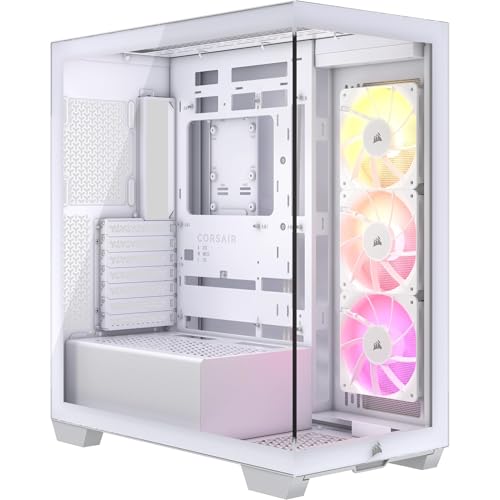
The CORSAIR 3500X ARGB White is the choice for a builder who wants a clean, modern panoramic case from a mainstream brand with straightforward fan control. Its wraparound tempered glass panels cover the front and side in one continuous view, the three included RS120 ARGB fans light the interior evenly, and reverse-connection motherboard support keeps the connector side of the board out of sight. The mid-tower layout also leaves space for a large graphics card and a standard set of drives without forcing a compact parts list.
Specs
- Mid-tower ATX case with panoramic tempered glass panels
- 3x CORSAIR RS120 ARGB fans included
- Reverse-connection motherboard compatible
- Model number CC-9011279-WW
- Wraparound tempered glass front and side design
- 2 year manufacturer warranty
Best for: A clean white panoramic build with reverse-connection board support and three included ARGB fans.
Watch out for: The case ships with three fans, so check whether your cooling plan needs additional intake fans, especially for a high-power graphics card.
Which One Fits Your Situation
You want the most complete case out of the box
Choose the Antec C5 ARGB. Seven fans, a built-in ARGB and PWM fan controller, and 270-degree glass mean the case arrives ready to build, with no extra fan order and no separate controller to wire in. It is the simplest path to a finished showcase build, and the dual-chamber layout forgives the cable work that usually makes a first glass build look messy.
You are building a premium compact rig
Choose the Lian Li O11 Vision Compact White. The three-panel glass and the hidden AIO tube routing give it the cleanest view in this roundup, and the back-connect support suits a builder who wants the motherboard tray to look as considered as the rest of the desk. Add your own fans to match the cooling your parts need, and use the included top mesh panel if airflow becomes the priority.
You are building a white-themed PC
Choose the Thermaltake View 270 Plus TG ARGB Snow. The white frame, the front and side glass, and the three included ARGB fans keep the colour scheme consistent without extra parts, and the E-ATX support gives you room for a larger board. It is the most direct way to get a bright, glass-fronted build in one order.
You want the panoramic look on a tight budget
Choose the MUSETEX K2 Black. Seven pre-installed PWM ARGB fans, dual tempered glass, and a Type-C front port cover the features that usually cost extra, and the full ATX support means you do not have to buy a smaller motherboard to fit it. Just double-check the fan count on the exact listing, since more than one variant of this case is sold under the same model name.
Common Mistakes
- Buying for the glass alone and ignoring where intake air actually enters the case, which leaves the graphics card breathing warm air.
- Ordering a graphics card that is longer than the case clearance once the glass panels and the front fan mounts are in place.
- Assuming every case includes fans, then discovering that a premium glass case ships with none and needs a separate fan order.
- Mixing a back-connect motherboard with a case that does not support it, which leaves the rear connectors with nowhere to go.
- Forgetting to check radiator thickness against memory clearance, so a top-mounted radiator collides with tall memory sticks.
Frequently Asked Questions
Does a tempered glass front make a PC run hotter?
It can, because solid glass blocks direct front intake and forces the case to draw air from the side, bottom, or top instead. Cases in this guide compensate with side and bottom fan mounts, but the effect depends on your fan layout and your components. A high-power graphics card needs a clear intake path, so check the fan positions on the listing before you buy.
Is tempered glass safe on a PC case?
Tempered glass is heat-treated so it resists knocks better than standard glass and breaks into small blunt pieces rather than sharp shards if it does fail. Handle the panels by their edges, set them down on a soft surface during a build, and tighten their screws gently, because overtightening or a hard knock on a corner is the most common way a panel gets damaged.
How many fans do I need with a glass-front case?
Most mid-tower glass-front builds work well with at least three intake fans and one rear exhaust fan, which is the baseline the three-fan cases in this guide already meet. Builds with a high-power graphics card or a large radiator benefit from filling the side and bottom mounts as well. Check how many fans your chosen case includes, then add only the mounts your parts actually need.
Can I fit a back-connect motherboard in any of these cases?
No, only cases designed for it support the rear-connector layout. The Lian Li O11 Vision Compact White and the CORSAIR 3500X ARGB White both list back-connect or reverse-connection support in their Amazon titles, while the other cases here are built around standard motherboards. Confirm the support in the listing for the exact variant you order, since model names can cover several versions.