Our Short List of 3
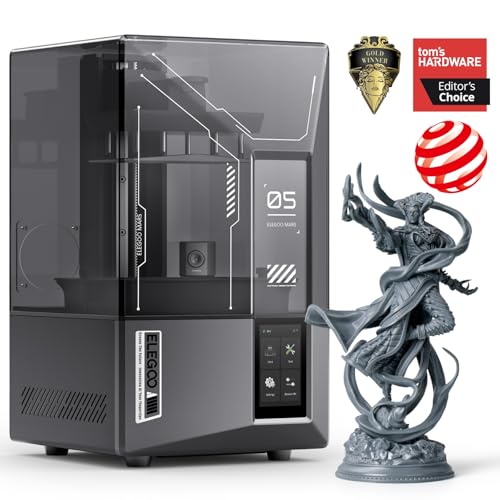
- Best for: Jewelers and hobbyists printing their first resin pieces in a small workspace.
- 7-inch 9K mono LCD
- Build volume of 153.36 x 77.76 x 165 mm
- Print speed up to 150 mm per hour
- Smart automatic leveling

- Best for: Small studios that need the finest detail across larger jewelry batches.
- 10-inch 16K mono LCD
- Build volume of 8.33 x 4.66 x 8.66 inches
- Smart tank heating at 30 degrees Celsius
- Print speed up to 150 mm per hour

- Best for: Hobbyists who want sharp detail on small jewelry pieces without a large machine.
- 7.1-inch monochrome LCD
- XY resolution of 22 microns
- Build volume of 6.5 x 2.8 x 6.7 inches
- Print speed up to 80 mm per hour
All 3 Picks at a Glance
| Product | Specs | Action |
|---|---|---|
| ELEGOO Mars 5 Ultra |
| Check price on Amazon |
| ELEGOO Saturn 4 Ultra 16K |
| Check price on Amazon |
| Phrozen Sonic Mini 8K S |
| Check price on Amazon |
Key takeaways
- Compare four high-detail resin 3D printers for jewelry work, from a compact 8K starter to a 16K large-format machine, with specs from Amazon.
Jewelry printing is a detail-first decision, and the number that matters most is the horizontal resolution of the screen, not the size of the machine. A ring band, a prong setting, or a filigree pattern lives or dies on how finely the printer can draw each layer, so a small printer with a sharp screen often beats a large printer with a coarse one. Build volume matters second, because it decides whether a jeweler prints one ring at a time or a full tray of pieces in a single run.
This guide is for jewelers printing wax patterns for casting, hobbyists making rings and pendants at home, and small studios that need repeatable batches of small parts. The four resin printers below were picked from their names and specifications on Amazon product pages, covering compact starters, mid-size workhorses, and a large-format machine so the resolution and the build area can be weighed together.
Quick Picks
As an Amazon Associate we earn from qualifying purchases.
| Product | Best for | Key spec from title |
|---|---|---|
| ELEGOO Mars 5 Ultra | First jewelry printer in a small workspace | 7-inch 9K mono LCD |
| ELEGOO Saturn 4 Ultra 16K | Finest detail on larger jewelry batches | 10-inch 16K mono LCD |
| ANYCUBIC Photon Mono M7 Pro | Fast batch printing with resin heating | 10.1-inch 14K mono LCD |
| Phrozen Sonic Mini 8K S | Sharp detail on a compact budget frame | 7.1-inch mono LCD at 22 micron XY |
How to Choose
Screen resolution and XY precision
The screen sets the smallest feature a printer can draw, and jewelry is full of small features: prongs, milgrain edges, engraved lines, and thin shanks. A 9K screen on a small build plate packs its pixels tightly, which keeps curves smooth and edges crisp, while the same resolution spread across a large plate leaves wider gaps between pixels. Read the XY resolution figure on the Amazon listing, usually given in microns, and compare it across printers with similar build sizes rather than comparing the K number alone, because a lower K number on a smaller screen can still out-resolve a higher one on a bigger screen.
Build volume against batch size
A jeweler rarely prints one piece at a time for long, so the build plate decides how many rings, pendants, or earring pairs fit in a single run. Compact printers suit one-off custom work and learning, while a plate above two hundred millimetres wide lets a small studio queue a full day of pieces overnight. Measure the largest piece you expect to print, including its supports, and leave margin around it, because a model that barely fits the plate leaves no room for the supports that hold it steady during printing.
Resin compatibility and castable options
Standard resin makes display models and prototypes, but casting needs a castable or wax-like resin that burns out cleanly from a mould. Before choosing a printer, confirm that the resins you plan to use cure at the 405 nanometre wavelength the machine produces, and check whether the manufacturer lists castable resins among the supported materials. A printer that only runs well with its own brand of resin can quietly raise the running cost of every batch, while an open machine accepts third-party castable resins without a fight.
Speed, leveling, and the finishing workflow
Print speed decides how many batches fit in a working day, yet the headline figure usually assumes a fast resin and a thick layer, so treat it as a ceiling rather than a promise. Automatic leveling and a tilt-release vat cut the setup and failure rate on small, delicate prints, which matters more for jewelry than raw speed does. Remember the rest of the workflow too: every resin print needs washing and ultraviolet curing before it is handled, so budget bench space, gloves, and ventilation alongside the printer itself.
The 4 Best Options
ELEGOO Mars 5 Ultra
- Best for: Jewelers and hobbyists printing their first resin pieces in a small workspace.
- 7-inch 9K mono LCD
- Build volume of 153.36 x 77.76 x 165 mm
- Print speed up to 150 mm per hour
- Smart automatic leveling
Jewelers and hobbyists printing their first resin pieces in a small workspace.
Confirm the build volume fits your largest piece with its supports attached, since the compact plate fills up fast when batching several rings at once.
The Mars 5 Ultra is the friendliest starting point in this guide, pairing a 7-inch 9K mono screen with automatic leveling and an AI camera that watches the print. Its build volume suits rings, pendants, and earrings without wasting resin on empty plate space, and the 150 millimetre per hour top speed keeps small batches moving. WiFi transfer means files go to the printer without carrying a USB stick across the workshop, and the compact frame fits on a bench that a larger machine would crowd out.
Watch out for: Confirm the build volume fits your largest piece with its supports attached, since the compact plate fills up fast when batching several rings at once.
ELEGOO Saturn 4 Ultra 16K
- Best for: Small studios that need the finest detail across larger jewelry batches.
- 10-inch 16K mono LCD
- Build volume of 8.33 x 4.66 x 8.66 inches
- Smart tank heating at 30 degrees Celsius
- Print speed up to 150 mm per hour
Small studios that need the finest detail across larger jewelry batches.
Check the resolution figure and the tank heating details on the listing, and confirm the printer fits your bench, since the larger frame needs more space than the compact models in this guide.
The Saturn 4 Ultra 16K is the detail leader here, with a 10-inch 16K mono screen that resolves fine jewelry features larger machines blur. Its build volume is wide enough for a full tray of rings or a larger pendant in one run, and smart tank heating holds the resin at 30 degrees Celsius so prints stay consistent in a cool workshop. A flip-up lid keeps the work area accessible, and the same 150 millimetre per hour top speed as the Mars 5 Ultra means the bigger plate does not slow a batch down.
Watch out for: Check the resolution figure and the tank heating details on the listing, and confirm the printer fits your bench, since the larger frame needs more space than the compact models in this guide.
ANYCUBIC Photon Mono M7 Pro
The M7 Pro is built for throughput, combining a 10.1-inch 14K screen with a top speed of 170 millimetres per hour when paired with high-speed resin. Its build volume is the largest in this guide, so a studio can queue a full set of pieces in one run, and the resin heating function keeps the vat at a steady temperature for consistent curing. Leveling-free setup removes one of the common failure points for beginners, and the LighTurbo 3.0 light system is designed to keep light even across the whole plate.
Specs
- 10.1-inch 14K mono LCD
- Build volume of 223 x 126 x 230 mm
- Print speed up to 170 mm per hour with high-speed resin
- COB LighTurbo 3.0 light source
- Resin heating with temperature control
- Leveling-free setup
Best for: Small studios printing large batches of jewelry pieces quickly.
Watch out for: Note that the top speed figure assumes high-speed resin at a 0.1 mm layer thickness, so standard resin will print more slowly than the headline number suggests.
Phrozen Sonic Mini 8K S
- Best for: Hobbyists who want sharp detail on small jewelry pieces without a large machine.
- 7.1-inch monochrome LCD
- XY resolution of 22 microns
- Build volume of 6.5 x 2.8 x 6.7 inches
- Print speed up to 80 mm per hour
Hobbyists who want sharp detail on small jewelry pieces without a large machine.
Confirm the build volume against your largest design, since the compact plate suits rings and earrings better than tall or wide statement pieces.
The Sonic Mini 8K S proves that a small printer can still hold jewelry-grade detail, with a 7.1-inch mono screen and 22 micron XY resolution that keeps prongs and engraved lines sharp. Its build volume covers rings, earrings, and small pendants, and the compact body takes up little bench space next to a wash and cure station. It is the most focused machine in this guide: no large plate, no extra automation, just a sharp screen aimed at small, detailed work.
Watch out for: Confirm the build volume against your largest design, since the compact plate suits rings and earrings better than tall or wide statement pieces.
Which One Fits Your Situation
A first resin printer for rings and pendants
Pick the ELEGOO Mars 5 Ultra. Automatic leveling removes the most common beginner setup error, the 9K screen is sharp enough for rings and pendants, and the compact build volume keeps resin use low while you learn. WiFi transfer and the AI camera add convenience without adding bench footprint, which suits a first machine in a home workspace.
A small studio batching pieces every day
Pick the ANYCUBIC Photon Mono M7 Pro. Its wide build plate holds a full tray of pieces in one run, the resin heating keeps curing consistent through long sessions, and the top speed suits a studio that needs several batches finished in a working day. The 14K screen still holds the detail a jewelry batch needs.
The finest detail for intricate designs
Pick the ELEGOO Saturn 4 Ultra 16K. Its 16K screen resolves the fine lines, filigree, and prong work that coarser screens soften, and the smart tank heating keeps the resin at a steady temperature for repeatable results. It is the right choice when the design itself is the selling point and the print has to show every line of it.
A compact starter on a tighter bench
Pick the Phrozen Sonic Mini 8K S. The 22 micron XY resolution keeps small pieces crisp, the tabletop frame fits beside a wash and cure station without crowding the bench, and the smaller plate matches one-off custom work. It suits a hobbyist who prints a few pieces at a time rather than full production trays.
Common Mistakes
- Comparing the K number of the screen without checking the XY resolution in microns or the size of the build plate it covers.
- Buying a large printer for one-off rings and wasting resin filling a vat sized for batch work.
- Using standard resin for pieces meant for casting, instead of a castable resin that burns out cleanly from the mould.
- Skipping the wash and cure step, which leaves prints soft, tacky, and dimensionally unreliable.
- Setting up a resin printer without ventilation, gloves, and a plan for handling liquid resin safely.
Frequently Asked Questions
Can I use a resin 3D printer for jewelry casting?
Yes, with the right resin. A castable or wax-like resin is designed to burn out cleanly from an investment mould, leaving a cavity for molten metal. Standard resin leaves ash and residue that ruins a cast, so confirm the resin is rated as castable and that it cures at the 405 nanometre wavelength your printer uses before committing to a production run.
Is resin or filament better for jewelry?
Resin is better for jewelry because its screen resolution captures prongs, engraving, and filigree that filament nozzles cannot draw finely enough. Filament suits larger display pieces and prototypes where surface smoothness matters less. For pieces that will be cast or worn, resin holds the detail, while filament works for rough mock-ups of size and shape.
Do I need a wash and cure station?
Yes, every resin print needs washing in solvent and curing under ultraviolet light before handling. Washing removes uncured resin from the surface, and curing hardens the piece fully so it holds its dimensions. Some jewelers wash by hand in a container, but a dedicated station keeps the process repeatable and keeps resin off the bench.
How do I keep resin printing safe at home?
Work in a ventilated room, wear nitrile gloves whenever handling liquid resin or uncured prints, and keep resin away from skin and eyes. Store resin bottles upright and out of sunlight, and cure waste resin and failed prints before disposal so no liquid resin reaches drains or household waste. Read the safety sheet for each resin you use, since handling guidance varies by formula.