Key takeaways
- Find the best PvP monitors for competitive play: fast refresh rates, low input lag and sharp QHD panels that keep every duel clear, smooth and responsive.
The best PvP monitors are not a separate type of display sold under a PvP label. PvP means player-versus-player, so this guide interprets the keyword as gaming monitors suited to competitive PvP play, where another person, not a scripted enemy, is reacting to every move you make. In that setting, a monitor matters because it controls how quickly you see an opponent, how clearly motion stays readable during a fast turn, and how consistently the image keeps up with your graphics card.


A good PvP monitor therefore puts speed first: high refresh rate, fast response, low input lag and adaptive sync matter more than extra screen size. Resolution still matters, because a sharper image makes distant opponents easier to spot, but it should not come at the cost of a slow panel. The quick answer is a 27-inch QHD monitor with at least 165Hz, a fast response time, adaptive sync and a DisplayPort connection. For serious fast shooters, a 240Hz OLED panel is the next step up; for a mix of PvP and story games, a 165Hz or 180Hz QHD IPS panel is the better balance.
Quick Picks
Our Short List of 3
- Check on Amazon
- Check on Amazon
- Check on Amazon
All 4 Picks at a Glance
| Product | Specs | Action |
|---|---|---|
| ASUS ROG Swift PG27AQDM — Fastest Response and OLED Contrast |
| Check price on Amazon |
| LG UltraGear 27GP850-B — Balanced PvP and Everyday Gaming |
| Check price on Amazon |
| Acer Nitro XV271U M3bmiiprx — High Refresh Rate With an Adjustable Stand |
| Check price on Amazon |
 Acer Nitro KG271U N3bmiipx — Straightforward High-Refresh QHD Gaming |
| Check price on Amazon |
How to Choose
Refresh Rate Comes First in PvP
Refresh rate is how many times per second a monitor redraws the image, measured in hertz. A 165Hz monitor redraws 165 times per second, while a 60Hz monitor redraws only 60 times. In PvP, that difference shows up as smoother motion when you turn, strafe or track a moving target, and as a shorter gap between frames. It does not improve aim by itself, and it does not replace practice, game sense or a stable connection, but it removes one source of blur and delay between your input and what you see. For most players, 165Hz is a sensible starting point. A 180Hz panel adds a little headroom, while 240Hz suits players whose graphics card can sustain very high frame rates in their main games.
Response Time and Motion Clarity
Response time describes how quickly a pixel can change from one shade to another, usually quoted in milliseconds. A faster response time helps reduce ghosting, the faint trail left behind a fast-moving object, and motion blur, which makes fine detail harder to read during rapid movement. In PvP, that clarity matters when an opponent crosses your view quickly or you flick to a target. Manufacturers quote response time in different ways, so treat the headline number as a guide. A 1ms grey-to-grey figure, a 0.5ms figure and a 0.03ms OLED figure are not directly comparable across brands. Use a middle overdrive setting first: the fastest can create bright halos around moving objects, while the slowest can leave more blur.
Input Lag and Adaptive Sync
Input lag is the delay between your mouse or controller input and the result appearing on screen, and it is separate from network latency. A monitor with low input lag feels more direct, which matters in PvP duels where a fraction of a second can decide whether a shot lands or a dodge succeeds. Gaming monitors are generally designed with low input lag in mind. Look for a dedicated game mode, and keep extra image processing to a minimum when you play competitively. Adaptive sync matches the monitor refresh rate to the frame rate from your graphics card. Without it, a mismatch can cause screen tearing, where the top and bottom of the image show different frames, or stutter, where motion looks uneven. Check compatibility with your graphics card, and use DisplayPort where possible, because it is the usual connection for high refresh rates at QHD.
Resolution and Screen Size for Spotting Opponents
A 27-inch QHD monitor, at 2560 x 1440, is a strong fit for PvP. It gives you more detail than Full HD, so distant opponents, small interface elements and fine textures are easier to read, without demanding as much graphics power as a 4K display. At 27 inches, QHD also keeps text and interface elements at a comfortable size, and it suits a normal desk distance. A larger screen can be more immersive, but it can also force you to move your eyes further to check the minimap, health bar or kill feed, which is a disadvantage in fast PvP. A 24-inch Full HD monitor can still work well for the highest frame rates from a modest graphics card, but the monitors here all use 27-inch QHD as the most versatile choice for mixed play.
Panel Type: IPS, VA and OLED
Panel type affects colour, viewing angles, contrast and response time. IPS panels are the most balanced choice for PvP. They offer wide viewing angles, consistent colour and fast response times, and they suit players who also use the monitor for work, browsing or story-driven games. The two Acer monitors and the LG monitor in this guide use IPS panels, which is one reason they are easy to recommend for mixed use. VA panels can offer stronger contrast, with deeper blacks, but they can be slower in dark transitions, which may show as smearing in shadowy scenes. OLED panels, such as the one in the ASUS ROG Swift PG27AQDM, offer near-instant pixel response and very high contrast, with true blacks and vivid colour, so motion looks exceptionally clean. OLED needs more care, because static elements left on screen for very long periods can contribute to image retention, and OLED monitors are usually more expensive than IPS models.
Ports, Stand and Everyday Comfort
A PvP monitor should connect cleanly to your system and sit at the right height for long sessions. DisplayPort is the preferred connection for high refresh rates at QHD, and HDMI is useful for a console or a second device. Check how many of each port a monitor has, and whether the HDMI version supports the refresh rate you want at your chosen resolution. A USB hub is a useful extra, but it is not essential for PvP performance. The stand matters too. Height, tilt, swivel and pivot adjustments let you set the screen at eye level and reduce neck strain during long matches. A tilt-only monitor can still work, but you may need a monitor arm or a riser to reach a comfortable height.
The Best PvP Monitors Reviewed
ASUS ROG Swift PG27AQDM — Fastest Response and OLED Contrast
The ASUS ROG Swift PG27AQDM is the fastest monitor in this guide, and it is the pick for players who want the cleanest motion and the strongest contrast for competitive play. It uses a 26.5-inch viewable OLED panel with QHD resolution, a 240Hz refresh rate and a 0.03ms response time. OLED is the key difference: each pixel produces its own light, so black areas stay truly black and bright highlights stand out clearly. In a dark PvP map, that contrast can make an opponent at the edge of a shadow easier to distinguish from the background. The 240Hz refresh rate keeps motion smooth when your graphics card can sustain high frame rates, and G-SYNC Compatible support helps keep the image free of tearing when the frame rate varies.
The monitor includes an anti-glare micro-texture coating, a custom heatsink plus voltage optimisation intended to manage heat and reduce the risk of burn-in, 99% DCI-P3 colour coverage and true 10-bit colour. DisplayPort and HDMI cover a PC and a second device. There are trade-offs: avoid leaving the same static interface on screen at high brightness for very long periods, and use the monitor’s own care features where available. The panel is 26.5 inches viewable, slightly smaller than a standard 27-inch panel, and this is a premium monitor, so it makes most sense with a strong graphics card and frequent PvP play.
LG UltraGear 27GP850-B — Balanced PvP and Everyday Gaming
The LG UltraGear 27GP850-B is a balanced QHD gaming monitor for players who want strong PvP performance without moving to a premium OLED panel. It has a 27-inch Nano IPS display with QHD resolution, a 165Hz refresh rate that overclocks to 180Hz, and a 1ms grey-to-grey response time. That covers the core PvP needs: smooth motion, fast pixel response and a sharp image for spotting opponents. Nano IPS offers wide viewing angles and 98% DCI-P3 colour coverage, so colours stay consistent even from an angle. The monitor is G-SYNC Compatible and supports AMD FreeSync Premium, so it works with adaptive sync on both major graphics card platforms, and DisplayHDR 400 support adds modest HDR handling.
The stand adjusts for height, tilt, pivot and swivel, so you can set the screen at eye level and turn it easily. Two HDMI ports, one DisplayPort and a USB 3.0 hub give you room for a PC, a console and accessories without constant cable swapping. This is an older model, introduced in 2021, so check that the listing is the exact 27GP850-B model and not a similarly named variant. Its 165Hz refresh rate, rising to 180Hz with overclocking, is lower than the 240Hz ASUS panel above, but it is still a clear step up from 60Hz and suits a wider range of graphics cards.
Acer Nitro XV271U M3bmiiprx — High Refresh Rate With an Adjustable Stand
- Check on Amazon
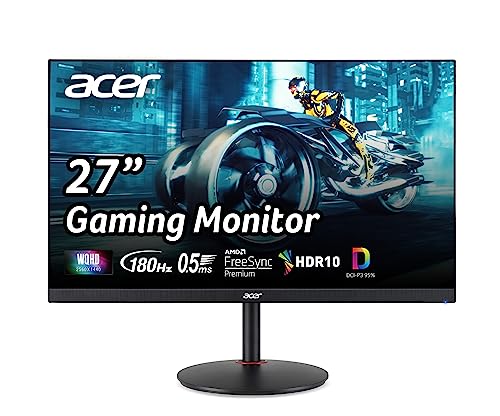
The Acer Nitro XV271U M3bmiiprx is a 27-inch QHD IPS gaming monitor with a refresh rate of up to 180Hz and a response time of up to 0.5ms. It is aimed at players who want a higher refresh rate than a standard 165Hz panel, with the colour consistency and viewing angles of IPS, and it includes a height-adjustable stand, which is useful for long PvP sessions. The 180Hz refresh rate gives you a little more motion smoothness than 165Hz, and it pairs well with a mid-range to strong graphics card that can sustain high frame rates at QHD. The 0.5ms figure is quoted as an up-to value, so treat it as a best-case figure rather than a constant. AMD FreeSync Premium support helps keep the image smooth when the frame rate changes, and the IPS panel supports 95% DCI-P3 colour coverage with HDR10 support.
In everyday use, the adjustable stand is a real advantage over monitors that only tilt. You can raise or lower the screen to eye level and tilt it to reduce glare. Built-in speakers are included, although they are best treated as a backup rather than a replacement for headphones, which give you clearer directional audio in PvP. One DisplayPort and two HDMI ports cover a PC and a console, and the monitor is VESA mountable if you prefer an arm. Check the exact model name before you buy: Acer uses similar names across its Nitro range, and a single letter can mark a different panel, refresh rate or stand. Confirm that the listing shows XV271U M3bmiiprx, 27-inch QHD, up to 180Hz and the IPS panel.
Acer Nitro KG271U N3bmiipx — Straightforward High-Refresh QHD Gaming
- Check on Amazon
The Acer Nitro KG271U N3bmiipx is a second 27-inch QHD IPS option from Acer, also with a refresh rate of up to 180Hz and a response time of up to 0.5ms. It shares much of the same core specification as the XV271U M3bmiiprx above, including QHD resolution, IPS colour, 95% DCI-P3 coverage, HDR10 support and AMD FreeSync, but it is positioned as a more straightforward model, so compare the two listings carefully before you choose between them. For PvP, the same strengths apply: the 180Hz refresh rate keeps motion smooth during fast turns, the IPS panel keeps colours and viewing angles consistent, and FreeSync helps prevent tearing when your frame rate varies. Two HDMI ports and one DisplayPort give you the connections most players need, and the monitor includes a speaker and VESA mounting support.
The difference is mainly in design and ergonomics, so check the stand adjustment, port layout and included cables on the exact listing. If the KG271U N3bmiipx listing has a more limited stand than the XV271U model, plan for a monitor arm or a riser. Also confirm that the listing is the new, non-renewed version, because a renewed listing for the same model name uses a different ASIN. The ASIN below is for the new listing.
What to Check Before You Buy
Before you order, confirm the exact model name and ASIN, because similar names can hide a different refresh rate, panel type or stand. Check your graphics card and cable: you need a card and a DisplayPort cable that can sustain your target frame rate at QHD, and you need to set the refresh rate in your display settings after you connect the monitor, because it may default to a lower rate. Measure your desk, check the return and warranty terms for dead pixels and backlight issues, and plan your audio: headphones give you clearer directional sound in PvP than built-in monitor speakers.
Finally, a monitor is only one part of PvP performance. A stable connection, a consistent frame rate, a comfortable mouse and keyboard, and a sensible in-game sensitivity setting all affect how well you play. Set the monitor to its game mode, enable adaptive sync, and adjust brightness and overdrive to suit your room before you judge it in a competitive match.
FAQ
What does PvP mean when choosing a monitor?
PvP means player-versus-player, so a PvP monitor is a gaming monitor chosen for competitive play against other people. No monitor is sold as a PvP-only display. Look instead for the traits that help in PvP: a high refresh rate, fast response time, low input lag and adaptive sync, with a sharp QHD image that makes opponents easy to spot.
Is 165Hz enough for PvP, or do I need 240Hz?
For most players, 165Hz is enough, and 180Hz gives you a little extra headroom. A 240Hz monitor, such as the ASUS ROG Swift PG27AQDM in this guide, is best if your graphics card can sustain very high frame rates in your main game and you play competitive shooters often. If your frame rate is usually well below 240 frames per second, a 165Hz or 180Hz QHD monitor will give you most of the benefit at a lower demand on your system.
Is QHD better than Full HD for PvP?
QHD, at 2560 x 1440, gives you more detail than Full HD, which can help you spot distant opponents and read small details. It also needs more graphics power to sustain the same frame rate. Full HD can still work well if you want the highest possible frame rate from a modest graphics card, but for a 27-inch screen, QHD is the more versatile choice for mixed PvP and everyday gaming.
Does an OLED monitor help in PvP?
An OLED monitor can help because its pixels respond almost instantly, which keeps motion very clean, and its high contrast makes dark scenes easier to read. The ASUS model in this guide offers a 0.03ms response time and a 240Hz refresh rate for that reason. OLED monitors usually cost more than IPS models, and they need sensible use to reduce the risk of image retention from static elements, so weigh the speed benefit against the extra care and cost.
Should I choose IPS or VA for PvP?
IPS is usually the safer choice for PvP because it offers wide viewing angles, consistent colour and fast response times, which suit a mix of competitive and story games. VA can offer stronger contrast and deeper blacks, but some VA panels are slower in dark transitions, which can show as smearing. If you choose VA, check how it handles dark motion in the games you play most.
Bottom Line
The best PvP monitors here share the same core idea: a 27-inch QHD panel, a high refresh rate, fast response and adaptive sync, chosen for competitive play rather than for a PvP label. For the fastest motion and strongest contrast, choose the ASUS ROG Swift PG27AQDM and its 240Hz OLED panel. For balanced PvP and everyday gaming, choose the LG UltraGear 27GP850-B. For 180Hz QHD performance, either Acer Nitro model works, with the XV271U M3bmiiprx offering the more flexible stand. Choose the refresh rate your graphics card can sustain, confirm the exact model and ASIN before you order, and set the refresh rate and adaptive sync correctly once the monitor arrives.
Disclosure: As an Amazon Associate, we may earn from qualifying purchases.