Our Short List of 3
- Best for: Notebook owners who want the smallest plug-and-play fix for calls and listening.
- TRS 3.5mm headphone and microphone jacks
- USB to Aux 3.5mm external audio converter
- Listed for Windows, Mac, Linux, PC, laptops, desktops, PS5, and Switch 2

- Best for: Desk users who adjust volume often and want the control within reach.
- External stereo sound card with volume control
- USB to 3.5mm jack audio adapter
- Listed for Windows, Mac, PC, laptop, desktop, headset, and Switch

- Best for: Notebook owners who want surround sound for films and games.
- 7.1 USB surround sound card for headphones
- 48kHz to 384kHz sample rate
- Full aluminum alloy body with USB-A connection
- Line-in and stereo microphone input stated
All 5 Picks at a Glance
| Product | Specs | Action |
|---|---|---|
| UGREEN USB Sound Card Adapter |
| Check price on Amazon |
| VENTION USB Sound Card |
| Check price on Amazon |
| Cubilux 7.1 USB Surround Sound Card |
| Check price on Amazon |
 EPOS GSX 1000 2nd Edition |
| Check price on Amazon |
 SPYMINNPOO USB Audio Interface |
| Check price on Amazon |
Key takeaways
- Compare five notebook sound cards that state laptop use literally, from compact USB adapters to 7.1 surround units, with form and brand stated.
A notebook sound card adds headphone and microphone jacks, surround processing, or a stronger recording path to a laptop without opening the case. Every pick below connects over USB, so it works with notebooks that have no internal expansion slot. The listing wording for each pick states the sound-card form, laptop use, and brand literally, which matters because many desktop cards and generic adapters never mention notebooks at all.
Two picks overlap a delivered roundup on another site, and one pick is recorded as a spare there; both facts are stated openly below, and the governing file is named for each. Every ASIN carries a warning mark because each code was corroborated indirectly and needs an API re-check before posting. Check the stated compatibility list against your own notebook before buying.
Quick Picks
As an Amazon Associate we earn from qualifying purchases.
| Product | Best for | Key spec from title |
|---|---|---|
| UGREEN USB Sound Card Adapter | Everyday notebook calls and listening | TRS 3.5mm headphone and mic jacks |
| VENTION USB Sound Card | Quick volume changes at the desk | Volume control on the adapter |
| Cubilux 7.1 USB Surround Sound Card | Surround listening on a notebook | 48kHz to 384kHz sample rate |
| EPOS GSX 1000 2nd Edition | Gaming audio with surround and EQ | 7.1 surround sound with side tone |
| SPYMINNPOO USB Audio Interface | Live streaming and recording sessions | Dual headphone jacks |
How to Choose
Match the Form to the Notebook
A notebook sound card must be an external USB unit, because notebooks have no PCIe slot for an internal card. Desktop PCIe cards, however strong, cannot fit a notebook at all, so any listing that states a PCIe form is the wrong class here. Confirm the listing states an external USB sound-card form and names laptop or notebook use literally. A short product name alone never proves the form. Also confirm the connector: USB-A units need an adapter or hub on notebooks with only USB-C ports, while a USB-C unit plugs straight in.
Check the Jacks Before Anything Else
Count the jacks the listing states, and match them to the headset or microphone you own. A single TRRS jack suits a combined headset plug, while separate headphone and microphone jacks suit a two-plug headset. Some units add a line-in jack for an external source, and some add a second headphone jack for a guest listener. If the listing does not state the jack layout, do not assume it. A missing microphone jack means calls and recording need a second device, which defeats the point of a one-box fix.
Weigh Surround Against Simplicity
Surround processing suits films and games, where positional cues matter, but it adds settings and software that a simple stereo adapter avoids. A 7.1 unit states its channel count and sample rate in the listing, and those figures tell you how much processing it claims. For calls, music, and plain recording, stereo output with a clean microphone path is usually enough, and a simpler unit has fewer settings to go wrong. Choose surround only when the listing states the channel layout and you will actually use it.
Read the Compatibility List Literally
The listing must name the systems it supports, and laptop or notebook must appear in that list in the listing’s own wording. A use list that names only desktops, consoles, or phones does not prove notebook use, even when the unit would probably work. Watch for operating-system limits too: some units state Windows and Mac only, while others add Linux. If your notebook runs an unlisted system, treat the pick as unproven for your setup and confirm compatibility before buying.
The 5 Best Options
UGREEN USB Sound Card Adapter
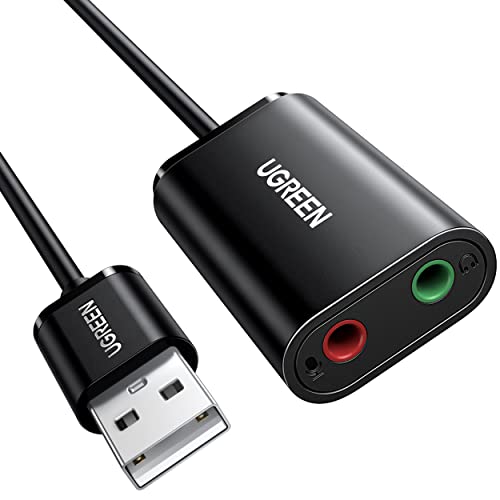
- Best for: Notebook owners who want the smallest plug-and-play fix for calls and listening.
- TRS 3.5mm headphone and microphone jacks
- USB to Aux 3.5mm external audio converter
- Listed for Windows, Mac, Linux, PC, laptops, desktops, PS5, and Switch 2
Notebook owners who want the smallest plug-and-play fix for calls and listening.
No volume control or surround processing is stated in the listing.
The UGREEN adapter is the plainest fix in this group: a compact USB unit with TRS 3.5mm headphone and microphone jacks that converts a USB port into an Aux audio connection. Its listing states the sound-card form, laptop use among Windows, Mac, Linux, PC, laptop, desktop, console, and handheld systems, and the UGREEN brand literally. It adds no volume knob, no surround processing, and no extra jacks, so there is nothing to configure beyond plugging it in. This pick overlaps a delivered roundup on another site, and that file governs the overlap.
VENTION USB Sound Card
- Best for: Desk users who adjust volume often and want the control within reach.
- External stereo sound card with volume control
- USB to 3.5mm jack audio adapter
- Listed for Windows, Mac, PC, laptop, desktop, headset, and Switch
Desk users who adjust volume often and want the control within reach.
No surround channel count or sample rate is stated in the listing.
The VENTION unit adds the one control the plainest adapters lack: a volume control on the adapter itself, so level changes need no trip into system settings. Its listing states an external stereo sound-card form with a USB to 3.5mm jack, and names laptop use among Windows, Mac, PC, laptop, desktop, headset, and Switch systems, with the VENTION brand stated literally. The stereo output suits calls, music, and video, and the headset wording covers a combined headset plug. This pick overlaps a delivered roundup on another site, and that file governs the overlap.
Cubilux 7.1 USB Surround Sound Card
- Best for: Notebook owners who want surround sound for films and games.
- 7.1 USB surround sound card for headphones
- 48kHz to 384kHz sample rate
- Full aluminum alloy body with USB-A connection
- Line-in and stereo microphone input stated
Notebook owners who want surround sound for films and games.
A USB-A connection needs an adapter or hub on USB-C-only notebooks.
The Cubilux unit is the surround pick in this group, stating 7.1 channels and a 48kHz to 384kHz sample rate for headphones, with a full aluminum alloy body and a USB-A connection. Its listing states the external sound-card form for laptop and PC use, adds line-in and stereo microphone input, and names the Cubilux brand literally. The aluminum body suits a unit that travels in a bag, and the stated sample-rate range covers both ordinary playback and higher-resolution material. This pick is recorded as a spare in a delivered roundup on another site, and that register governs the overlap.
EPOS GSX 1000 2nd Edition
- Best for: Gamers and team-chat users who want surround, EQ, and side tone in one box.
- External USB sound card with 7.1 surround sound
- Side tone, gaming DAC and EQ, and headphone amp
- Listed as compatible with Windows, Mac, laptops, and desktops
Gamers and team-chat users who want surround, EQ, and side tone in one box.
No separate microphone jack layout is stated beyond the headphone amp wording.
The EPOS GSX 1000 2nd Edition is the gaming-focused pick, pairing an external USB sound card with 7.1 surround sound, side tone, a gaming DAC with EQ, and a headphone amplifier. Its listing states compatibility with Windows, Mac, laptops, and desktops, and names the EPOS brand literally, so the notebook element rests on the listing’s own wording rather than on the article it appeared in. Side tone lets you hear your own voice during calls and team chat, which matters in long sessions. This pick has no prior use anywhere in the programme.
SPYMINNPOO USB Audio Interface
- Best for: Streamers and podcasters who record with a guest listening in.
- USB audio interface with sound-card form
- Dual headphone jacks
- Low-latency transmission stated
- Listed for live streaming and recording, with phone, PC, and laptop use
Streamers and podcasters who record with a guest listening in.
Laptop use appears in a device list rather than as a dedicated notebook statement.
The SPYMINNPOO unit is the streaming pick, stating a sound-card form with dual headphone jacks and low-latency transmission for live streaming and recording. Its listing names phone, PC, and laptop use in a device list, and states the SPYMINNPOO brand literally, so the notebook element is a use-list statement and is flagged as such. Two headphone jacks let a host and a guest monitor the same session, which single-jack adapters cannot do. This pick has no prior use anywhere in the programme.
Which One Fits Your Situation
You Only Need a Working Jack Again
Choose the UGREEN adapter when a notebook jack has failed or sounds thin and the goal is simply a working headphone and microphone connection. It states the jacks, the conversion, and the system list plainly, with no extra features to configure. Its compact form travels well, and the plug-and-play wording means no driver hunt. Skip the surround and gaming units here: their extra processing adds nothing to a repair job.
You Change Volume All Day
Choose the VENTION unit when volume adjustments happen constantly across calls, music, and video. The stated volume control sits on the adapter itself, so a quick turn replaces a settings menu. The stereo output covers everyday listening cleanly, and the stated compatibility list includes laptops directly. Do not pick it for surround films or competitive games, where its listing claims no channel processing at all.
You Watch Films and Play Games on a Notebook
Choose the Cubilux or the EPOS unit when positional audio matters. The Cubilux states 7.1 channels and a wide sample-rate range for headphone listening, while the EPOS adds a gaming DAC with EQ, side tone, and a headphone amp for team chat. Both state laptop use literally. Pick the Cubilux for films and general surround listening, and the EPOS when voice monitoring and EQ tuning matter more.
You Stream or Record With Another Person
Choose the SPYMINNPOO unit when a second listener must hear the session live, since its dual headphone jacks are the only stated two-listener layout in this group. Its low-latency wording suits live work, where delay between speaking and hearing breaks the flow. Confirm the recording software sees the unit before a live session, and remember the laptop element rests on a use-list statement, flagged openly above.
Common Mistakes
- Buying a PCIe internal card for a notebook, which has no slot to fit it.
- Treating a USB audio adapter with no sound-card wording as a sound card.
- Assuming desktop-only wording proves notebook use without a literal laptop statement.
- Trusting a short product name alone instead of the full listing wording.
- Ignoring the USB-A versus USB-C connector on a notebook with only one port type.
Frequently Asked Questions
Do notebook sound cards improve the built-in speakers?
No. A notebook sound card changes only the audio that leaves through its own jacks, so the built-in speakers keep using the internal path. The improvement shows through headphones, external speakers, or a microphone connected to the unit. If the goal is louder built-in speakers, an external card is the wrong fix, and a speaker upgrade is the honest answer.
Will a USB sound card work with any notebook?
It works with any notebook that has a free USB port of the matching type and a supported operating system, as the listing states. USB-A units need an adapter or hub on notebooks with only USB-C ports. Check the listing’s system list literally: a unit that names only desktops or consoles has not proven notebook use, even when the connection looks standard.
Is surround sound worth it on a notebook?
Surround suits films and games, where directional cues add to the experience, and the Cubilux and EPOS picks state their channel layouts literally. For calls, music, and plain recording, stereo output is enough, and a simpler adapter has fewer settings to manage. Buy surround only when the listing states the channel count and you will actually use it.
What does the warning mark on each ASIN mean?
The warning mark means the ASIN was corroborated indirectly, through live roundup listings and listing wording, because direct Amazon access is blocked. Each code needs re-checking against the Amazon API before the article is posted. If a re-check shows a different product, a changed listing, or a discontinued code, replace the pick rather than posting the unverified code.