Key takeaways
- Five portable hard drives built for travel, from shock-resistant HDDs to pocket SSDs, compared so you can pick the right backup drive for trips and work.
A laptop bag on a long trip holds a lot of risk. One hard knock in an overhead bin, one spill at a cafe table, or one lost bag can take every photo, work file, and video clip with it. A portable hard drive built for travel is the simplest guard against that loss: a small, bus-powered drive that rides in a jacket pocket or a day pack and keeps a second copy of everything that matters.

Travel drives are not the same as the big drives that sit on a desk. A travel drive draws all its power from the USB port, so there is no power brick to pack and no wall outlet to hunt for. It is small enough to carry every day, tough enough to survive a bag, and quick enough to back up a full day of photos before dinner. This guide covers five drives that meet that bar: three portable HDDs with large capacity for the money, and two pocket SSDs that trade some capacity for speed.
Disclosure: As an Amazon Associate, we earn from qualifying purchases.
Quick Picks
Our Short List of 3
- Best for: Photographers who carry a drive through airports, trails, and rough weather and need a tough 2TB backup that can take a knock.
- Capacity: 2TB
- Drive type: Portable HDD, 2.5-inch, 5400 RPM mechanical disk
- Interface: USB 3.0, USB 2.0 compatible
- Speed: Up to 130 MB/s
- Best for: Travelers who want a slim, light, everyday backup drive with real encryption for work files and photos, without paying the SSD premium.
- Capacity: 2TB
- Drive type: Portable HDD, 2.5-inch mechanical disk
- Interface: USB 3.1 and USB 3.0 compatible, SuperSpeed USB-A cable included
- Dimensions: 4.22 x 2.95 x 0.44 inches
- Best for: Content creators who need fast, rugged storage they can edit from in the field, and travelers who want the toughest drive here.
- Capacity: 2TB
- Drive type: Portable SSD, NVMe
- Interface: USB 3.2 Gen 2
- Speed: Up to 1,050 MB/s read, up to 1,000 MB/s write
All 5 Picks at a Glance
| Product | Specs | Action |
|---|---|---|
| LaCie Rugged Mini 2TB |
| Check price on Amazon |
| WD My Passport 2TB |
| Check price on Amazon |
| Samsung T7 Shield 2TB |
| Check price on Amazon |
 Toshiba Canvio Advance 2TB |
| Check price on Amazon |
 SanDisk Extreme Portable SSD 1TB |
| Check price on Amazon |
Short on time? Pick the LaCie Rugged Mini for rough trips, the WD My Passport for light everyday carry, or the Samsung T7 Shield for video editing from the drive. The Toshiba Canvio Advance suits simple automatic backup, and the SanDisk Extreme Portable is the smallest fast drive here.
How to Choose
HDD vs SSD for travel. A portable HDD holds a spinning disk inside. It gives you the most capacity for the money, and 2TB is the sweet spot for a trip: room for thousands of photos, hours of video, and a full laptop backup. An SSD has no moving parts, so it shrugs off knocks, and it moves files far faster. The trade is capacity: for the same outlay, an SSD holds less. If you back up photos and documents, an HDD is the sensible pick. If you edit video on the road, an SSD earns its place.
Ruggedness and drop protection. Maker drop claims are the first thing to check. The LaCie Rugged Mini is built to survive drops up to 4 feet, while the Samsung T7 Shield and the SanDisk Extreme Portable both carry drop protection up to 3 meters. Water and dust sealing matters too: both SSDs here carry IP65 water and dust resistance, which covers rain and dusty trails. A plain plastic HDD has none of that, so it needs a padded sleeve and a dry pocket.
Capacity vs weight. Two terabytes covers most trips, including a two-week holiday with daily shooting. One terabyte is enough when you travel light and back up only photos and documents. Four terabytes and up makes sense only for long video projects, because the drive gets thicker and heavier. Check the weight before you buy: the WD My Passport weighs 4.2 ounces, the Samsung T7 Shield weighs 98 grams, and the SanDisk Extreme Portable weighs 0.11 pounds.
USB-C vs USB-A. Most new laptops, tablets, and phones use USB-C, while older laptops and many hotel TVs still use USB-A. A drive with a USB-C cable in the box is the safer travel pick, and both SSDs here include USB-C to USB-C and USB-C to USB-A cables. The HDDs in this guide use USB 3.0 or USB 3.1 over a Micro-B connector, so carry a small USB-C adapter if your laptop has only USB-C ports. Speed follows the interface: USB 3.2 Gen 2 drives move data at up to 10 Gbps, while USB 3.0 drives top out at 5 Gbps.
Power and cables. Every drive in this guide is bus-powered, which means it runs from the USB port alone: no power brick, no outlet, no extra weight. One cable does the job, and a short cable is better than a long one in a cramped seat. Keep a spare cable in a different pocket, because a lost cable turns a backup drive into dead weight.
Encryption and backup software. A lost drive is a data breach as well as a lost backup. Password protection and hardware encryption keep your files unreadable if the drive goes missing, and the WD My Passport and the Toshiba Canvio Advance both offer it. The WD My Passport adds 256-bit AES hardware encryption plus backup software with ransomware defense, while the Toshiba Canvio Advance ships with backup and password tools for Windows. The LaCie Rugged Mini adds a Data Rescue Service and a one-month Adobe Creative Cloud All Apps membership. Set the password up at home and run a full backup before you leave.
5 Best Options
LaCie Rugged Mini 2TB
- Best for: Photographers who carry a drive through airports, trails, and rough weather and need a tough 2TB backup that can take a knock.
- Capacity: 2TB
- Drive type: Portable HDD, 2.5-inch, 5400 RPM mechanical disk
- Interface: USB 3.0, USB 2.0 compatible
- Speed: Up to 130 MB/s
Photographers who carry a drive through airports, trails, and rough weather and need a tough 2TB backup that can take a knock.
The USB 3.0 Micro-B cable is an older connector, so pack the right adapter for your laptop. The drive needs reformatting for full Mac use, and its 130 MB/s ceiling is far slower than any SSD here, so large video dumps take longer.
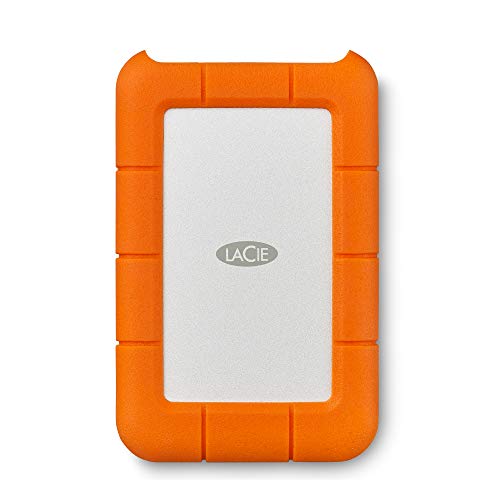
The LaCie Rugged Mini is the classic travel hard drive, with a bright orange rubber bumper wrapped around a 2.5-inch portable HDD. It is built to survive drops up to 4 feet and to resist shock, dust, and rain, which is exactly the abuse a drive takes in a camera bag. At 2TB it holds a long trip of photos and video with room to spare, and its USB 3.0 connection moves files at up to 130 MB/s.
Watch out for: The USB 3.0 Micro-B cable is an older connector, so pack the right adapter for your laptop. The drive needs reformatting for full Mac use, and its 130 MB/s ceiling is far slower than any SSD here, so large video dumps take longer.
WD My Passport 2TB
- Best for: Travelers who want a slim, light, everyday backup drive with real encryption for work files and photos, without paying the SSD premium.
- Capacity: 2TB
- Drive type: Portable HDD, 2.5-inch mechanical disk
- Interface: USB 3.1 and USB 3.0 compatible, SuperSpeed USB-A cable included
- Dimensions: 4.22 x 2.95 x 0.44 inches
Travelers who want a slim, light, everyday backup drive with real encryption for work files and photos, without paying the SSD premium.
It has no rubber bumper and no water or dust sealing, so it needs a padded sleeve and a dry bag pocket. It is a spinning disk, so treat it gently while it is writing, and do not confuse it with renewed listings that share the same model number: buy the new listing.
The WD My Passport is the lightest full-size HDD in this guide. It measures 4.22 x 2.95 x 0.44 inches and weighs 4.2 ounces, so it slips into a jacket pocket and stays there all day. It is a 2TB mechanical drive with a USB 3.1 connection, and it comes with the strongest security bundle here: password protection, 256-bit AES hardware encryption, and backup software with ransomware defense.
Watch out for: It has no rubber bumper and no water or dust sealing, so it needs a padded sleeve and a dry bag pocket. It is a spinning disk, so treat it gently while it is writing, and do not confuse it with renewed listings that share the same model number: buy the new listing.
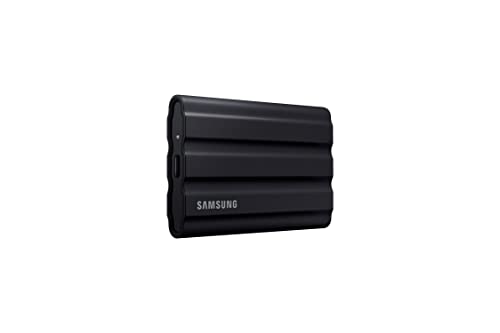
Samsung T7 Shield 2TB
- Best for: Content creators who need fast, rugged storage they can edit from in the field, and travelers who want the toughest drive here.
- Capacity: 2TB
- Drive type: Portable SSD, NVMe
- Interface: USB 3.2 Gen 2
- Speed: Up to 1,050 MB/s read, up to 1,000 MB/s write
Content creators who need fast, rugged storage they can edit from in the field, and travelers who want the toughest drive here.
Two terabytes of fast SSD costs more per terabyte than any HDD in this guide, so it is overkill if you only back up photos and documents. The rubber shell picks up dust and lint in a pocket, and the drive runs warm during very long writes.
The Samsung T7 Shield is the fastest rugged drive in this guide and the best pick for video work on the road. Its NVMe SSD reads at up to 1,050 MB/s and writes at up to 1,000 MB/s over USB 3.2 Gen 2, so you can edit video directly from the drive. A thick rubber shell gives it IP65 water and dust resistance and drop protection up to 3 meters, and Dynamic Thermal Guard manages heat during long transfers. It weighs just 98 grams and includes both USB-C to USB-C and USB-C to USB-A cables.
Watch out for: Two terabytes of fast SSD costs more per terabyte than any HDD in this guide, so it is overkill if you only back up photos and documents. The rubber shell picks up dust and lint in a pocket, and the drive runs warm during very long writes.
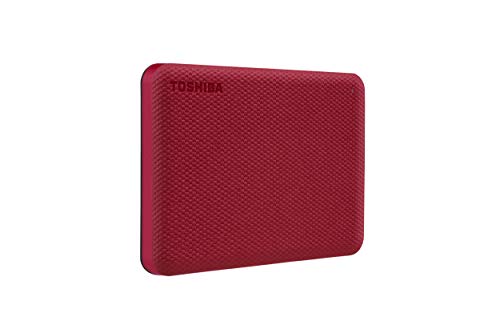
Toshiba Canvio Advance 2TB
- Best for: Travelers who want a simple, slim 2TB backup drive with automatic backup and password tools included, at a lower outlay than the rugged or SSD picks.
- Capacity: 2TB
- Drive type: Portable HDD, 2.5-inch mechanical disk
- Interface: USB 3.0, USB 2.0 compatible, up to 5 Gbps
- Dimensions: 109 x 78 x 14 mm
Travelers who want a simple, slim 2TB backup drive with automatic backup and password tools included, at a lower outlay than the rugged or SSD picks.
The bundled backup and password tools are Windows-only, so Mac users should plan on their own backup software. It uses a Micro-B USB 3.0 cable rather than USB-C, so pack an adapter for USB-C-only laptops, and it has no drop or water protection.
The Toshiba Canvio Advance is the straightforward pick: a slim 2TB portable HDD with automatic backup and password software in the box. It measures 109 x 78 x 14 mm and weighs 149 grams, making it one of the thinnest 2TB drives you can carry. The USB 3.0 interface moves data at up to 5 Gbps, and the drive is bus-powered, so a single cable connects it to any laptop. The red finish is easy to spot in a crowded bag.
Watch out for: The bundled backup and password tools are Windows-only, so Mac users should plan on their own backup software. It uses a Micro-B USB 3.0 cable rather than USB-C, so pack an adapter for USB-C-only laptops, and it has no drop or water protection.
SanDisk Extreme Portable SSD 1TB
- Best for: Travelers who pack light and want the smallest, fastest drive here for photos and documents, with a clip-on loop for a bag.
- Capacity: 1TB
- Drive type: Portable SSD, NVMe
- Interface: USB-C, USB 3.2 Gen 2
- Speed: Up to 1050 MB/s read, up to 1000 MB/s write
Travelers who pack light and want the smallest, fastest drive here for photos and documents, with a clip-on loop for a bag.
One terabyte fills up fast on a video-heavy trip, so check your shooting volume before you choose it over a 2TB drive. The listing is the older model of this drive, so confirm you are buying the 1TB SDSSDE61-1T00-G25 listing.
The SanDisk Extreme Portable SSD is the smallest drive in this guide, built for life in a pocket. It measures 3.96 x 2.06 x 0.35 inches, weighs 0.11 pounds, and carries a carabiner loop so you can clip it to a bag. Inside is a 1TB NVMe SSD that reads at up to 1050 MB/s and writes at up to 1000 MB/s over USB-C and USB 3.2 Gen 2. IP65 water and dust resistance and drop protection up to 3 meters cover rain, dust, and drops, and 256-bit AES encryption keeps files private if the drive is lost.
Watch out for: One terabyte fills up fast on a video-heavy trip, so check your shooting volume before you choose it over a 2TB drive. The listing is the older model of this drive, so confirm you are buying the 1TB SDSSDE61-1T00-G25 listing.
Which One Fits
Match the drive to the trip. A photographer on a two-week shoot should take the LaCie Rugged Mini: 2TB of tough, weather-resistant storage that survives life in a camera bag. A business traveler who backs up documents and photos each night will be happiest with the WD My Passport, which is light, slim, and encrypted. A video creator who edits on the road needs the Samsung T7 Shield, because its speed lets you work straight from the drive. A traveler on a tight budget who wants set-and-forget backup should take the Toshiba Canvio Advance, as long as they use Windows or bring their own backup software. A minimalist with a phone, a tablet, and a small day pack should take the SanDisk Extreme Portable and keep an eye on its 1TB limit.
If you can only carry one drive, take 2TB. It covers photos, video, and a full laptop backup for most trips. If your trip runs longer than a month or you shoot video every day, carry two drives and keep them in different bags: one for the daily backup, one as the spare copy.
Common Mistakes
Buying a desktop drive for travel. Desktop external drives need a power brick and a wall outlet, and their 3.5-inch disks are not made to move. They have no place in a travel bag. Every drive in this guide is bus-powered and pocket-sized.
Picking capacity you will never fill, or too little. A 500GB drive seems light until a week of 4K video fills it on day five. A 5TB drive seems safe until you feel its weight and thickness every day. Two terabytes is the right middle ground for most travelers, with 1TB as the light-packing option.
Skipping the password. An unencrypted backup drive is a gift to anyone who finds your lost bag. Turn on password protection and hardware encryption before you leave home, and store the password somewhere safe that is not in the same bag as the drive.
Backing up once and forgetting it. A backup from day one does not protect photos from day ten. Set a daily habit: plug the drive in each evening, copy the day’s files, and check that the copy opens before you clear the memory card. A backup you never verify is only a hope.
Clearing memory cards before the copy is checked. Never format a card or delete originals until you have opened the copied files from the drive and confirmed they are intact. Keep the originals on the card until the backup is proven, and keep the drive in a different bag from the laptop when you travel between stops.
FAQ
Is an SSD or an HDD better for travel?
An SSD is tougher and faster, with no moving parts, so it suits rough trips and video editing on the road. An HDD gives you more capacity for the same outlay, so it suits photo backup and long trips where space matters more than speed. For most travelers, a rugged 2TB HDD is the best value, while a 1TB or 2TB SSD wins when speed and toughness come first.
Do I need a rugged drive for a normal holiday?
Not always, but the extra protection is cheap insurance on any trip. A plain drive in a padded sleeve is fine for a city break where the drive stays in a hotel room. A rugged drive earns its keep when the bag goes on a trail, a beach, or a boat, where drops, dust, and rain are part of the day. If you travel with a camera, a rugged drive is the safer default.
Can I use a portable hard drive with a phone or tablet?
Yes, with the right cable and a device that supports USB storage. Many Android phones and tablets and newer iPads accept a portable drive over USB-C, and the LaCie Rugged Mini lists iPad and iPhone compatibility. Check that your device can power the drive over USB and read its file format, and carry the right cable: USB-C for most new devices, with an adapter for older USB-A ports.
How much capacity do I need for a two-week trip?
Two terabytes covers most two-week trips, including daily photos, short video clips, and a full laptop backup. One terabyte is enough when you shoot photos only and travel light. If you shoot video every day, take a 2TB drive and leave room to spare, or carry a second drive as a spare copy in a different bag.