Our Short List of 3

- Best for: Students who multitask across tabs, documents and calls on a big screen.
- Processor: AMD Ryzen 7 5825U, 8 cores, up to 4.5 GHz
- Memory: 16GB DDR4-3200
- Storage: 512GB NVMe M.2 SSD
- Display: 15.6-inch FHD (1920 x 1080) touchscreen

- Best for: Students crossing campus all day who want one light machine for the whole degree.
- Processor: Apple M4 chip
- Memory: 16GB unified memory
- Storage: 256GB SSD
- Display: 13.6-inch Liquid Retina
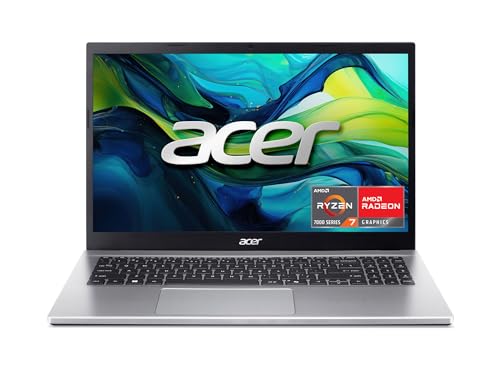
- Best for: Students who want Ryzen 7 pace now and a memory upgrade path later.
- Processor: AMD Ryzen 7 5825U
- Memory: 16GB DDR4, listing maximum 32GB
- Storage: 512GB PCIe Gen4 SSD
- Display: 15.6-inch FHD (1920 x 1080) IPS
All 4 Picks at a Glance
| Product | Specs | Action |
|---|---|---|
| Lenovo IdeaPad Slim 3 15.6-inch Touch (Ryzen 7 5825U) |
| Check price on Amazon |
| Apple MacBook Air 13-inch (M4) |
| Check price on Amazon |
| Acer Aspire Go 15 AG15-42P (Ryzen 7 5825U) |
| Check price on Amazon |
 Acer Aspire Go 15 AG15-31P (Core i3-N305) |
| Check price on Amazon |
Key takeaways
- Compare four laptops for college students on processor, memory, storage and screen, from a light MacBook Air to roomy 15.6-inch Windows models.
A college laptop is a four-year commitment, and the real decision is not which machine is fastest on day one. It is which compromises you can live with daily: a bigger screen against a heavier carry, more memory against more storage, and an operating system that must run whatever software your major names in its requirements. Get those trade-offs right and almost any current machine handles lectures, research and essays without drama.
This roundup is for first-year students buying before term starts, returning students replacing a machine that no longer keeps up, and parents choosing for a dorm-bound student. Each pick was selected from its Amazon listing name and spec table — processor, memory, storage and display — and the four span a light 13.6-inch MacBook Air and three 15.6-inch Windows laptops at different levels of headroom.
Quick Picks
As an Amazon Associate we earn from qualifying purchases.
| Product | Best for | Key spec from title |
|---|---|---|
| Lenovo IdeaPad Slim 3 15.6 | Multitasking on a big touch screen | Ryzen 7 5825U, 16GB RAM, 512GB SSD |
| Apple MacBook Air 13 | All-day carrying between classes | M4 chip, 16GB memory, 256GB SSD |
| Acer Aspire Go 15 AG15-42P | Windows pace with upgrade room | Ryzen 7 5825U, 16GB RAM, 512GB SSD |
| Acer Aspire Go 15 AG15-31P | Notes, papers and streaming | Core i3-N305, 8GB RAM, 128GB UFS |
How to Choose
Start with the processor and memory
Most coursework is not heavy, but it is constant: a learning platform, twenty research tabs, a document and a video call running at once. That mix rewards memory more than raw chip speed. Treat 16GB as the comfortable target for a machine that must last four years, because memory usually cannot be added later — the MacBook Air and many slim Windows models are sealed. Eight gigabytes still works for document-only degrees, but it leaves little headroom. An eight-core Ryzen 7 or Apple M4 also keeps group projects, statistics tools and light editing from slowing the whole machine down.
Storage fills faster than students expect
A first-year drive looks empty until lecture recordings, phone photo backups, game installs and one large software package for a major arrive. Plan on 256GB as the practical floor and 512GB as the comfortable size for a full degree. The 128GB configuration in this roundup only makes sense for students who already store documents and media in cloud drives and stream everything else. Also check the storage type in the listing: NVMe SSD machines copy large files briskly, while UFS storage is slower when you move a semester of recordings in one go.
Screen size is a daily carry decision
The screen choice follows your timetable. Students crossing a large campus between lectures feel every extra inch and pound, which is why the 13.6-inch MacBook Air at 2.73 pounds is the easy carry here. A 15.6-inch panel earns its size back at a dorm desk: two documents side by side, wider spreadsheets and more comfortable video lectures. Whatever the size, hold out for at least a 1920 x 1080 panel so text stays crisp through long reading sessions, and treat touch as a bonus for markup and group work rather than a requirement.
Check ports, camera and the fine print
Small details decide how the laptop fits dorm life. A clear webcam matters for hybrid seminars and recorded presentations, and the listings here range from 720p cameras to a 12MP Center Stage camera. HDMI and USB-C ports make it simple to present in study rooms or add a desk monitor later. Read the operating system line closely: one pick ships in Windows 11 S mode, which restricts installs to the Microsoft Store until you switch it out of that mode. Finally, confirm the exact memory and storage on the listing, since one model name can cover several configurations.
The 4 Best Options
Lenovo IdeaPad Slim 3 15.6-inch Touch (Ryzen 7 5825U)
- Best for: Students who multitask across tabs, documents and calls on a big screen.
- Processor: AMD Ryzen 7 5825U, 8 cores, up to 4.5 GHz
- Memory: 16GB DDR4-3200
- Storage: 512GB NVMe M.2 SSD
- Display: 15.6-inch FHD (1920 x 1080) touchscreen
Students who multitask across tabs, documents and calls on a big screen.
The listing describes a professionally upgraded configuration, so confirm the exact memory and storage on the page before ordering.
The Lenovo IdeaPad Slim 3 is the Windows pick for students whose day is a wall of browser tabs, documents and video calls. Its eight-core Ryzen 7 5825U and 16GB of memory keep that mix moving without the pauses that make older budget machines feel tired by sophomore year, and the 512GB SSD leaves room for coursework, photos and a media library. The 15.6-inch touchscreen suits shared group work around a library table, while the full-size layout helps with long papers and spreadsheet-heavy classes.
Apple MacBook Air 13-inch (M4)
- Best for: Students crossing campus all day who want one light machine for the whole degree.
- Processor: Apple M4 chip
- Memory: 16GB unified memory
- Storage: 256GB SSD
- Display: 13.6-inch Liquid Retina
Students crossing campus all day who want one light machine for the whole degree.
Storage is fixed at 256GB and memory cannot be upgraded later, so choose the configuration with your full degree in mind, and confirm your major’s software runs on macOS.
The Apple MacBook Air 13-inch suits students who walk between lectures all day and want one machine that lasts the whole degree. At 2.73 pounds it disappears into a backpack, the M4 chip handles documents, research and light photo work without fuss, and 16GB of unified memory is the configuration to pick for four years of multitasking. The 13.6-inch Liquid Retina screen is sharp for reading and writing, and the 12MP Center Stage camera keeps you framed in seminar calls and recorded presentations.
Acer Aspire Go 15 AG15-42P (Ryzen 7 5825U)
- Best for: Students who want Ryzen 7 pace now and a memory upgrade path later.
- Processor: AMD Ryzen 7 5825U
- Memory: 16GB DDR4, listing maximum 32GB
- Storage: 512GB PCIe Gen4 SSD
- Display: 15.6-inch FHD (1920 x 1080) IPS
Students who want Ryzen 7 pace now and a memory upgrade path later.
The screen is non-touch, and the model family covers several configurations, so match the AG15-42P-R3NB model code on the listing before ordering.
The Acer Aspire Go 15 AG15-42P is the pick for students who want Ryzen 7 pace in a straightforward Windows shell, with a route to more memory later. The listing pairs the eight-core Ryzen 7 5825U with 16GB of DDR4 and a 512GB PCIe Gen4 SSD, and its spec table lists a 32GB memory ceiling, which matters when a first-year machine has to stay useful through final year. The 15.6-inch IPS panel gives documents and slides a wide, clear working area for dorm desks.
Acer Aspire Go 15 AG15-31P (Core i3-N305)
- Best for: Students on a fixed budget whose work is writing, browsing and streamed lectures.
- Processor: Intel Core i3-N305
- Memory: 8GB LPDDR5
- Storage: 128GB UFS
- Display: 15.6-inch FHD (1920 x 1080) IPS
Students on a fixed budget whose work is writing, browsing and streamed lectures.
The 128GB of UFS storage fills quickly, and Windows ships in S mode, which limits installs to the Microsoft Store until you switch it out of that mode.
The Acer Aspire Go 15 AG15-31P covers the essentials for students whose coursework lives in documents, learning platforms and streamed lectures. The Core i3-N305 and 8GB of LPDDR5 memory are enough for that workload, and the 15.6-inch Full HD IPS screen is easy on the eyes during long reading sessions. Storage is the compromise: 128GB of UFS fills quickly, so this machine fits students who keep files in cloud drives and treat the laptop as a writing and browsing tool first.
Which One Fits Your Situation
You cross campus on foot all day
Choose the MacBook Air. At 2.73 pounds with a 13.6-inch screen it is the only pick here that stays unnoticeable in a backpack through a full day of lectures, and the M4 chip with 16GB of memory is strong enough that you are not trading speed for portability. It also suits students whose courses are document, browser and video based rather than tied to Windows-only software.
Your degree runs on tabs, sheets and group calls
Choose the Lenovo IdeaPad Slim 3. The Ryzen 7 5825U, 16GB of memory and 512GB SSD are the strongest multitasking mix in this group, and the 15.6-inch touchscreen helps when a project team gathers around one screen. Pick it if your classes lean on spreadsheets, research databases and long documents, and you mostly work from a desk or library table.
You want Windows headroom that can grow
Choose the Acer Aspire Go 15 AG15-42P. It matches the Lenovo on processor class, memory and storage today, and its listing shows a 32GB memory ceiling, so a later memory upgrade can stretch its life instead of forcing a replacement. Pick it if you expect heavier coursework in later years, such as data tools or light editing, and prefer a non-touch screen.
The budget is fixed and the work is writing
Choose the Acer Aspire Go 15 AG15-31P. Its Core i3-N305, 8GB of memory and big Full HD screen cover essays, learning platforms, email and streamed lectures without strain. It fits students who keep files in cloud storage and mainly need a comfortable writing machine. Skip it if your major needs specialist software or you store large media libraries locally.
Common Mistakes
- Buying 8GB of memory for a four-year degree, then living with slowdowns once coursework and software get heavier in later years.
- Choosing 128GB of storage and planning to manage it later, when lecture recordings and photo backups usually fill it within the first year.
- Picking the biggest screen on the page without checking backpack fit and carry weight against a full day of walking between buildings.
- Skipping the operating system check: some majors require Windows-only software, and one listing here ships in S mode, which limits where apps can come from.
- Assuming every configuration under one model name is identical — verify the processor, memory and storage printed on the exact listing you order.
Frequently Asked Questions
How much memory does a college laptop need?
Sixteen gigabytes is the comfortable target for a full degree, because it keeps a browser full of research tabs, documents and a video call running together smoothly. Eight gigabytes still handles writing, email and learning platforms, but it leaves little room as software grows heavier over four years of updates.
Is 256GB of storage enough for four years?
For most students, yes, provided coursework files live partly in cloud storage and media is streamed rather than downloaded. Lecture recordings, photo backups and large program installs are what push a drive toward full. If your major uses big local software or you keep a personal media library on the machine, the 512GB configurations in this roundup are the safer pick.
Should a student choose macOS or Windows?
Follow your major’s software list first. Many engineering, business and specialist programs name Windows versions of their tools, while writing, social sciences and media courses usually run happily on either system. All four picks here are full laptops rather than tablets, and three run Windows, so check your department’s requirements page before deciding, not after the machine arrives.
Does a touchscreen matter for coursework?
It is a convenience, not a requirement. Touch helps when you mark up slides, sign forms or gather around one screen for group work, which is where the Lenovo in this roundup earns its place. For typing-led degrees, a good keyboard and a clear non-touch panel matter more day to day, and every pick here has a Full HD or sharper screen for long reading sessions.